
Retexture FiveM clothing in the browser
Load a clothing <span class='k'>.ydd</span> and <span class='k'>.ytd</span>, paint straight onto the garment in 3D with its UV wireframe as a guide, and export a rebuilt texture dictionary. Or start from a library of 4193 base-game and DLC garments.
Two ways in
Bring your own. Drop a clothing .ydd plus its .ytd — loose, or inside a .zip, .oiv or .rpf. The garment renders in 3D and its textures open as editable documents. Export rebuilds the .ytd. 5 credits.
Pick from the library. 4193 base-game and DLC garments are pre-loaded — tops, legs, shoes, masks, chains, bags, undershirts, body armour, decals. Choose one, switch between its texture variants, paint it, and export a complete addon: .ydd + .ytd + .ymt + .meta + fxmanifest.lua, no file hunting. 10 credits.
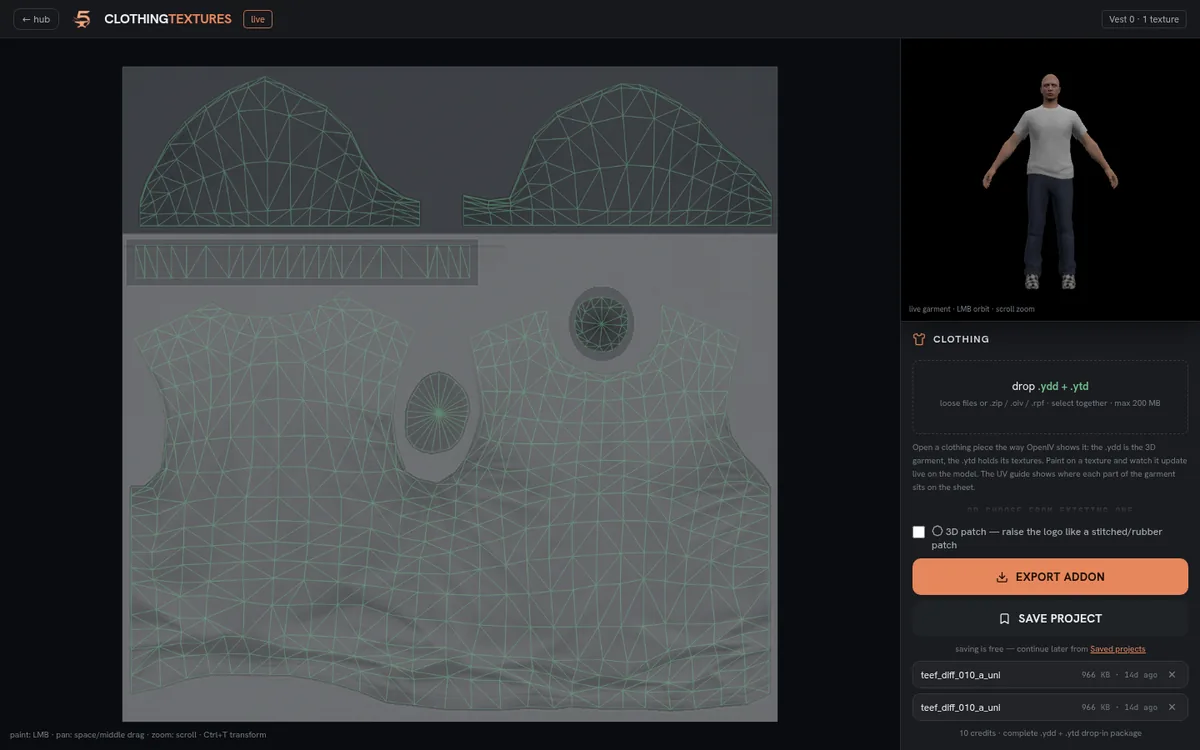
Painting on the real garment
The editor is layer-based: brush, eraser, flood fill, colour picker, rectangle cut, free transform with flip, and undo. Import a logo as a layer and place it with Ctrl+T.
The garment's UV wireframe overlays the canvas so you can see where the chest, back and sleeves land before you paint, and the 3D model updates live as you work. That is the whole point — a flat texture file tells you nothing about where a logo will actually sit.
Library garments open at 2048px so a logo stays sharp in-game rather than inheriting the base game's 512px texture.
Raised patch logos
A flat printed logo can be turned into a raised patch — stitched or rubber-badge style relief. This works by baking your logo into the garment's normal map, blended into the existing fabric normal only where the logo sits, so the surrounding weave is untouched. There is a depth slider for how pronounced it is.
Installing the result
A retexture export is a drop-in .ytd: replace the original and restart. A library export is a full addon resource — drop it into resources, add it to server.cfg and fully restart the server, since clothing meta is only read at boot.
Frequently asked
Can I add a logo to a FiveM shirt without Blender?
Yes. Load the garment, import your logo as a layer, place it with the UV wireframe as a guide, and export a rebuilt texture dictionary.
Do I need to own the clothing files?
No. The built-in library covers 4193 base-game and DLC garments, so you can pick one and export a complete addon without sourcing any files.
What is a 3D patch?
Your logo baked into the garment's normal map so it reads as raised relief — stitched-patch or rubber-badge style — instead of a flat print.
Why is my exported logo blurry in-game?
Base-game clothing textures are 512px. Library garments are upscaled to 2048px on open specifically so logos stay sharp; if you brought your own low-resolution texture, the ceiling is the source.
Try it free
Create a free account, join the Discord for your credits, and build your first asset in minutes.